Make one song from different rooms.
Lathe Cloud passes the song between you and the people you play with. Everyone records on their own copy, in their own time, and pushes when their part is ready. Every revision is kept, with a list of what it changed.
How it works.
- Record on your own copyOpen the song and play your part. Nothing you do reaches anyone else until you push, and Lathe works just the same with no internet.
- Push when it's readyYour take goes up as a new revision, with a line from you and a list of what changed: new clips, faders, sends, plug-in settings, tracks, tempo.
- Pull when you want theirsNew revisions come down when you ask. What you have open never changes under you. Lathe offers to open the newest.
- r6Chorus guitar, doubledDev · 5 min ago
- r5Second verse vocal, compedMara · 2 hours ago
- r4Bass re-amped, mix for the labelMara · yesterday · kept
- r3Lead line for the chorusMara · 4 days ago
- r2Tempo up, bass inMara · 6 days ago
- r1Drums, first takeMara · 1 Nov
- Guitar new take, bars 17–24
- Guitar second take, panned right
- Guitar fader −8.0 → −6.0 dB
Every revision, and what it changed.
Select a revision to see what it changed, and what opening it would change in your copy. Opening one keeps what you had as a Local revision first, so looking back never costs you anything. Keep the mix you sent out, and it stays however many revisions come after.
If someone pushed while you were playing, Lathe never writes over their revision. It sets your changes aside, opens theirs so you can listen, then puts your changes back on top. If you both changed the same thing, it asks which to keep, in plain words. Then you push.
Share the whole song. Let them push one track.
Send your guitarist the song. On their computer they can change anything that helps them play a better part: turn the vocal down, mute the keys, slow the song down to practice the bridge. When they push, only the guitar goes up.
Tick the tracks they can push.
In Cloud > Projects, choose Share, pick a friend, and then Can push only some tracks. One track or several. Your bass player can have the bass, and your keys player the keys, on the same song.
dev@example.com can change anything on their computer, but a push only sends the tracks you tick. Everything else stays as you have it.
- Drums
- Bass
- ✓Guitar
- Keys (MIDI)
- Lead (MIDI)
- Vocal
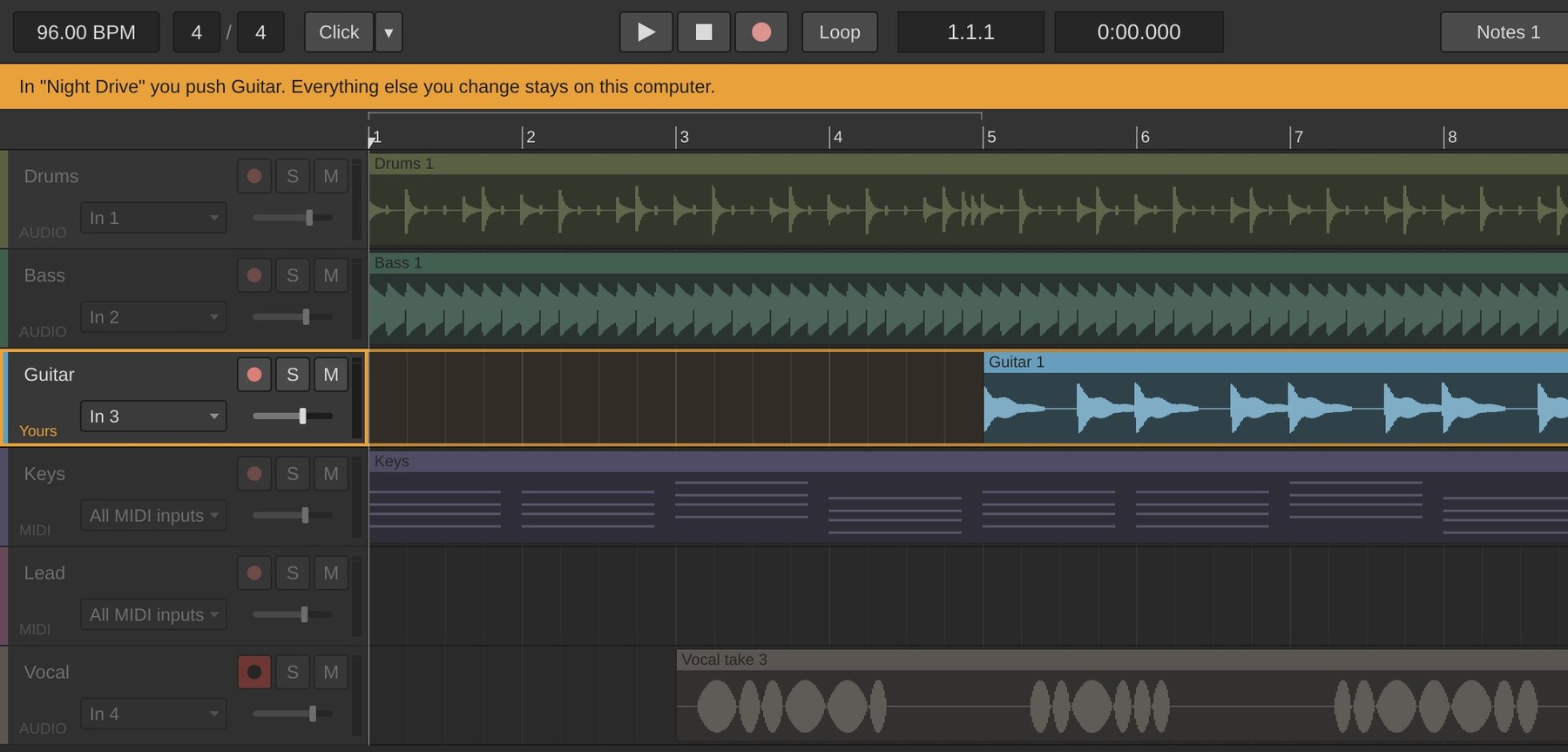
He can see where his part goes.
A bar under the transport says what he pushes. His track is marked Yours and outlined; the rest are dimmed, but they still play, and he can still change them. Cloud > Push Guitar sends the guitar.
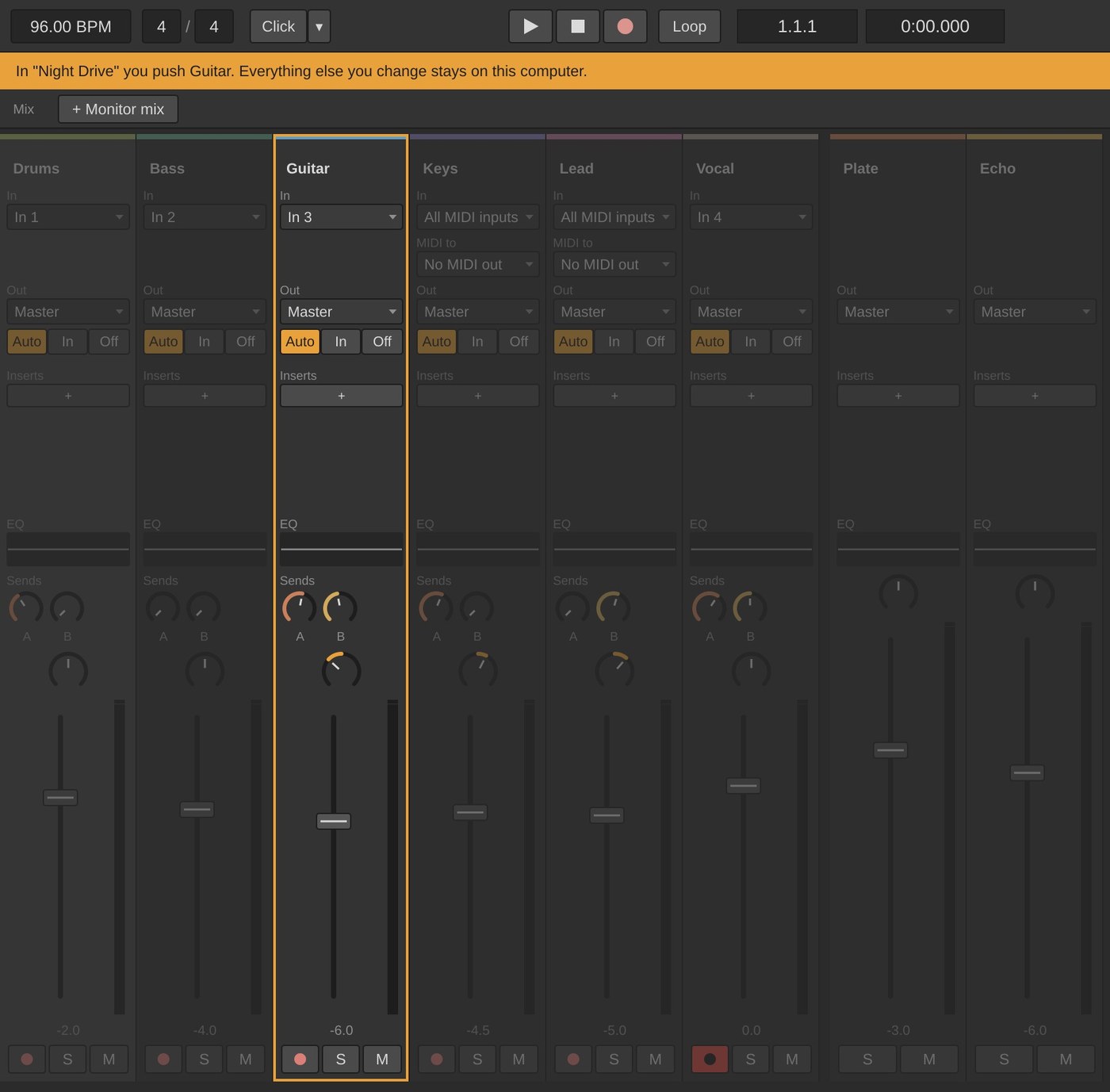
- The same in the mixerHis channel strip is outlined, and the rest are dimmed, the returns too.
- Lands on the newest revisionHis guitar goes on top of whatever was pushed last, so he never undoes the vocal Mara pushed an hour ago.
- Checked by Lathe CloudEvery push is compared with the revision before it. A push that changes anything outside his tracks is turned away, whichever copy of Lathe sent it.
- His other changes stay with himThe quieter vocal, the muted keys and the slower tempo stay on his computer.
- Change it any timePick different tracks, or let him edit the whole song, from his name in the song's people list.
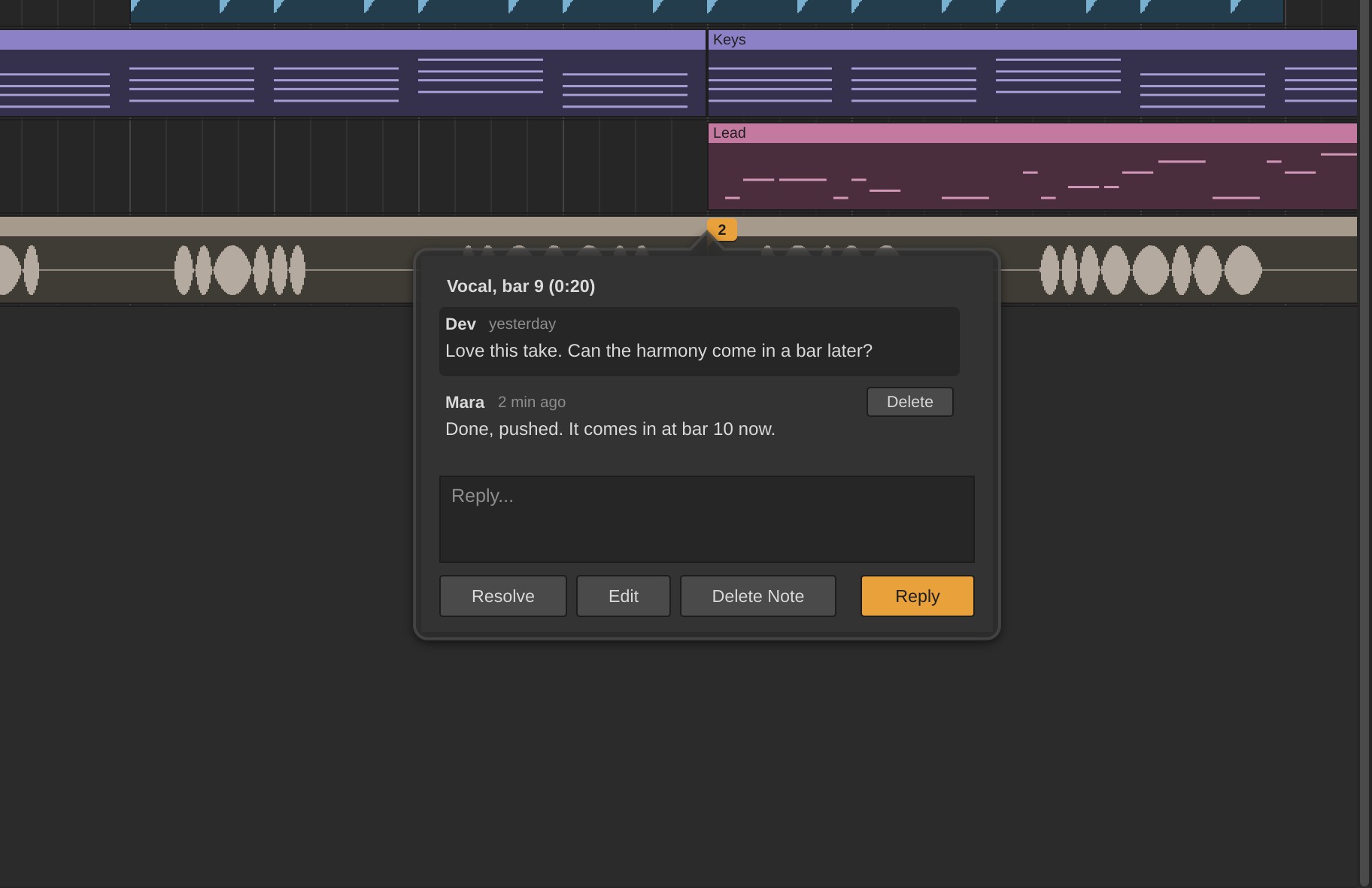
Talk about the song on the song.
Pin a note to a track at the moment you mean, reply in a thread, and resolve it when it's done. Song notes hold the plan and what's left. Notes reach everyone within a minute, with no push, and everyone on the song can write them, people who can only view it too.
Offline, notes keep working, and they're sent when you're back.
Bring people in.
You share with friends: send a request from Cloud > Friends, or send a link.
- Invite someone with a linkCloud > Invite Someone by Link makes a link to send any way you like: to become friends, or to join a song, to edit or only to view. Whoever opens it types their email, and gets an account if they don't have one. A link works for 14 days, for up to 10 people.
- Send a listening linkFor the people who won't open Lathe. The song's owner can make a link that plays the song's mix in a browser, with no account, and listeners can leave a note at a moment in the song. It comes back to you as a song note. Share the Latest Mix updates what it plays; the link stays the same.
- Share a project, or one songA project is a group of songs: an album, a band, a client. Share the project and people get every song in it, the ones you add later too.
Who can do what.
| Open and pull | Push | Notes | Share and manage | |
|---|---|---|---|---|
| Owner | Yes | Anything | Write, and delete anyone's | Yes |
| Can edit | Yes | Anything | Write | – |
| Can push some tracks | Yes | Only their tracks | Write | – |
| Can view | Yes | – | Write | – |
| Listening link | Hears the mix in a browser | – | Leave one at a moment in the song | – |
Anyone can change their own copy, even someone who can only view. What you can do decides what goes up, never what you can try.
Only the owner shares, changes someone's access, renames, moves or deletes. Anyone can leave. If you lose access, Lathe tells you, and your copy stays on your computer as it was.
Your bandmates don't pay.
Whoever owns the songs has a plan. Everyone they share with can use a free account. Lathe Cloud is free while the beta runs.
| Plan | Price | What you can do | Revisions kept | Free bandmates |
|---|---|---|---|---|
| Free | $0 | Join songs shared with you: pull them, leave notes, and push if you can edit | – | – |
| Starter | $5 / mo | Your own songs, 5 GB each, 50 GB in all | Newest 5, plus kept | 2 can edit, any number can view |
| Pro | $10 / mo | Your own songs, 25 GB each, 250 GB in all | Newest 20, plus kept | Any number |
Beta testers get Starter free while the beta runs, then their first three months of any plan free when paid plans start. Prices may change before launch. When something doesn't fit, Lathe says what and why before anything uploads.
Nothing gets lost.
The cloud carries the song between you. The song itself lives on your computers.
- Your copy is yoursA song is an ordinary folder of WAV files on your computer. Opening it never needs the cloud, paid plan or not.
- Works offlineRecord, mix and write notes anywhere. Push when you're back.
- Lossless, and checkedTakes go up compressed without loss, about half the size, and come back identical to the byte. Every download is checked.
- No take goes up twiceAudio is stored once, so pushing a new mix doesn't send your takes again.
- Big sessionsSeveral files move at once, and a dropped connection picks up again.
- History comes with the folderCopy the song's folder and its history comes along.
Start a song with someone.
We're adding a few bands at a time to the Lathe Cloud beta.
Lathe itself is free, with no account needed. Download it.